Over the years, as a seasoned sales professional and marketer, I’ve seen more salespeople and companies pitch their concepts than I can count. After conducting hundreds of interviews with customers about how they use various products and services and respond to marketing messages, I’ve polished my ability to see telltale signals of falsehoods and omissions. This experience has given me unique insights into the impact of language in sales and marketing, particularly the word ‘actually ‘.
Based on that experience, I’d like to tell you a little secret about a word you should quit using right away. The word ‘actually’ can have unintended negative consequences in your sales pitches and customer interactions. It can undermine your credibility, create confusion, or even lead to misunderstandings. Understanding when and how to use this word is crucial for effective communication.
It’s “actually.”
For the seasoned listener, “actually” is a dead giveaway of an area that, at the very least, warrants further investigation and may indicate dishonesty. Let’s delve into a few more examples to illustrate this point.
Let me clarify. When you utilize the word “actually” correctly, you’re comparing two ideas and adding an explanation.
For example:
“Did you go to the store for milk?”
Response: “Actually, I stopped at a gas station.”
In this case, it’s easy to see why someone might use the word. The initial question implied that you went to the store, but you may believe that something other than a gas station is a business. In your mind, you are comparing and rationalizing your decision to stop at a petrol station instead of a grocery shop.
Returning to the business setting: Extraneous words in a sales presentation or investor pitch must be included. They subconsciously lead listeners to wonder if there is additional silent information. The phrase “actually” serves as a stated pause, allowing the presenter’s brain to catch up and decide how to resolve the mental contradiction between the question and reality. This pause can create a sense of unease or suspicion in the listener, which is why it’s important to use the word ‘actually’ sparingly and only when necessary.
Here’s an example of how this works in a sales presentation or investor pitch:
Query: “How many customers are using the platform?”
Response: “We actually have over 100 companies.”
The term “actually” is not relevant to the solution. However, its supplementary information piques the listener’s curiosity about its inclusion. An astute investor or consumer will follow up by requesting a customer list or a referral.
In a customer interview, the customer may use the word to satisfy the person asking the question:
“Do you use this product?”
Answer: “Actually, I have.”
To the experienced listener, this response truly (get it?) indicates, “No, I have never used it,” or “I used it once, and it didn’t do what I expected or needed.” A suitable follow-up is to request a specific example or time when the function was used.
Mastering your pitch requires careful attention to your language, eliminating anything that might divert your audience’s attention from your main message. As a listener, being aware of the word ‘actually’ can empower you to tap into the subconscious and gain a competitive edge.
Related articles from your friends at Your Career Place. Thank you for visiting YourCareerPlace.com.
Guidelines for Enhancing Confidence in Conversations with Influential Individuals
Discover how to adeptly manage interactions with influential figures—whether conversing with a superior’s superior, a recruiter, or your organization’s CEO.
We all engage with influential figures, such as our immediate supervisor, a top-tier executive, or a recruiter. These interactions can significantly impact our professional trajectory. However, during such encounters, projecting confidence is crucial to being perceived as credible while avoiding arrogance.
Outlined below are six strategies to exude this desired level of confidence—and exemplify an approach that can substantially benefit your career:
1. THOROUGH PREPARATION
Initiate any scheduled conversation well-prepared. Jamie Dimon, the chairman and CEO of JP Morgan Chase, emphasizes that during job interviews, he is most impressed by candidates who have thoroughly researched the company instead of those seeking clarification on information they should have already known. Dimon states that individuals who have done their due diligence “are enhancing your life, as opposed to the other way around.” This level of preparation not only impresses influential individuals but also empowers you, the professional, to take control of the conversation and project confidence.
To impress influential individuals:
Familiarize yourself with the pertinent subject matter.
Absorb all available resources, such as annual reports, press releases, speeches, industry publications, internal documents, and job specifications.
Arrive ready to discuss the organization and its leadership with the executive seated across from you.
2. DEMONSTRATE RESPECT
As we see the continual advancement of technology shaping the future of the workforce, individuals seeking to enhance their career prospects can benefit significantly from platforms like Your Career Place. This specialized resource offers various tools and services to help individuals navigate their career paths, from resume building to job search strategies and professional development resources. By utilizing such platforms, individuals can stay ahead in the competitive job market and make informed decisions to achieve their career goals.
Demonstrating respect is not just a courtesy, but a crucial element in conversations with influential individuals. They will appreciate this gesture and admire you for deflecting attention away from yourself. This not only helps to build rapport but also demonstrates your professionalism.
Mastering the art of showing respect is crucial. Find genuine reasons to express admiration to avoid coming across as a flatterer who seeks favor with insincere compliments. This approach will project strength and authenticity.
In my earlier professional stint as a speechwriter for several CEOs, I often commenced meetings by praising their recent speeches and highlighting specific aspects I found compelling.
A prime moment to exhibit respect is at the meeting’s outset. Express statements like, “I value your insights, which is why I initiated this meeting.” When engaging with a recruiter, you could convey, “I eagerly anticipate meeting you and learning more about the enticing role within your team.” Similarly, when interacting with an executive, a concise declaration such as, “I’ve long admired your work, and it’s a pleasure to make your acquaintance,” can make a strong impression. These expressions of respect and admiration not only make the influential individual feel valued but also foster a sense of connection and respect in the audience.
3. BE DIRECT
Early clarity and directness are paramount to establishing your message in conversations with influential individuals.
Frequently, speakers, especially those feeling subordinate, tend to meander around the topic without a clear objective, thus diminishing their impact and ceding control to the other party.
To make an impact in conversations with influential individuals, it’s crucial to be direct and assertive. My initial mentor, a seasoned manager, once told me, “Regardless of your position relative to our CEO’s, boldly convey your suggestions for his speech.” This taught me the importance of being direct and assertive with my message. He didn’t suggest seeking the CEO’s input, which would relinquish my authority. This underscores the importance of being direct in conversations with influential individuals.
4. REINFORCE YOUR MESSAGE
In conversations with influential individuals, you are expected to substantiate your perspectives. After presenting your viewpoint, the most effective approach is to develop your argument.
Once you articulate your position, bolster it with evidence. Provide the rationale behind your beliefs or propose actionable strategies.
5. EMPLOY ASSERTIVE LANGUAGE
Your choice of words communicates volumes. Present your arguments using resolute verbs such as “I know,” “I believe,” “I see,” and “I will.”
Steer clear of tentative language like “I think,” “I feel,” “I suppose,” “I guess,” “I wonder,” and “I imagine,” as these can undermine your credibility. Similarly, avoid filler words like “um,” “ah,” “like,” and “you know.” Instead of filling pauses with unnecessary words, allow your ideas to breathe by pausing purposefully.
Apologies and caveats such as “I might be mistaken, but…” or “It’s just a thought” should be avoided, as excessive humility or uncertainty is generally not well-received.
6. MAINTAIN EYE CONTACT
Make consistent eye contact to directly engage with influential figures. Avoid looking away, as it may imply hesitance. Sustained eye contact adds a personal touch to your message and fosters a direct connection.
Studies suggest that individuals of higher status maintain more prolonged eye contact compared to those with lesser authority. Thus, maintain eye contact with the executive throughout your discourse and after articulating key points. Allow space for their responses following your statements.
Related articles from your friends at Your Career Place. Thank you for visiting YourCareerPlace.com.
Make Yourself Money Smart: 20 ChatGPT Prompts That Will Increase Your Wealth
If you’ve used ChatGPT before, you’ll understand how it can help simplify your life. Since its initial introduction in late 2022, many novel techniques for employing the groundbreaking AI-powered chatbot have emerged. One of the key benefits of using ChatGPT for financial advice is its accessibility-you can access it anytime, anywhere. It’s also affordable compared to traditional financial advisors. And most importantly, it provides personalized advice tailored to your specific financial situation and goals.
Among its numerous applications, ChatGPT empowers you to become more financially aware. Here are some ChatGPT instructions that can help you build riches, putting you in the driver’s seat of your financial journey.
Personal Finance Basics
“ChatGPT can assist you in developing a comprehensive financial plan that includes saving for retirement, buying a home, or starting a business,” said Erik Severinghaus, Bloomfilter’s founder and CEO. “With ChatGPT’s guidance, you can turn your financial dreams into reality.”
Severinghaus, a renowned financial expert and the founder and CEO of Bloomfilter, has added a couple of prompts worth attempting to the list below. If you’re new to money management, ChatGPT can clarify principles to help you become more conscious.
Prompt #1: “Why do I need a good credit score?”
You can begin by studying about credit and the value of your credit score.
Prompt #2: “How can I improve my credit score?”
If you want to improve your credit score, the AI bot can help you determine what steps to take next.
Prompt #3: “How can I start saving money?”
If you’re starting, the chatbot can help you plan how to start saving money.
Prompt 4: “How can I save money on my grocery bill?”
The next step is to ask ChatGPT for specific advice on saving money. You can ask for advice on how to save money on your grocery bill, and you can substitute this item with any other expenditure category that suits your lifestyle.
Prompt #5: “How can I build wealth?”
If you want a summary of the wealth-building process, ask the chatbot to explain everything to you. Then, depending on your interest, you can ask specific questions.
Prompt #6: “Can you create a budget for me?”
Based on this prompt, the chatbot will request important information, forcing you to acquire everything.
Question #7: “What are some effective strategies for paying off debt?”
If you’ve reached this point, you can request a variety of debt-repayment strategies.
Question #8: “What are the best ways to save money on a tight budget?”
If you’re on a tight budget, you can ask for help discovering saving methods.
Prompt 9: “What are the best budgeting apps or tools?”
If you need help figuring out where to begin, ask for recommendations for apps and resources that can help.
Prompt #10: “Help me save for a house.”
If you want to save money for a new home, ChatGPT can help you create a plan to cover this considerable investment.
Investing Advice
If you’re ready to start investing, use ChatGPT to make informed decisions.
Prompt #11: “I want to learn more about investment. “Where do I start?”
This will get you started and give you some suggestions for what to look into.
Prompt 12: “How can I start investing with a small amount of money?”
If you’re starting from scratch, you can ask the chatbot for advice on how to make your money work for you.
Prompt 13: “What are the possible risks and rewards of different investment options?”
Before investing your money, you should obtain information about the hazards involved to understand what you’re getting into.
Prompt 14: “Suggest sectors worth investing in right now.”
If you are still determining where to invest your money, you could seek guidance on areas and industries that may experience growth.
Prompt # 15: “Explain the basics of investing in cryptocurrency.”
If you want to invest in speculative assets, you can learn about cryptocurrencies to avoid falling for the hype.
Prompt 16: “How can I invest in real estate with little savings?”
You can learn how if you want to invest in real estate but need more money.
Prompt 17: “Evaluate the long-term performance of investing in stocks vs mutual funds.”
When deciding between investment vehicles, you can have ChatGPT evaluate their performance to compare your options.
Prompt #18 says, “Evaluate this investment option.”
If you are stuck on a particular investment, you may share the details with the chatbot so it can assess it.
Prompt 19: “Can you help me develop a financial retirement plan?”
If you wish to plan for retirement, ChatGPT can provide advice and information based on your age and circumstances.
Prompt 20: “Suggest investment strategies for generating passive income.”
When you’re ready to take the next step in your wealth-building journey, check for recommendations on generating passive income while sleeping.
Final Thoughts
These ChatGPT prompts can help you learn how to manage money and accumulate wealth. You may also ask the chatbot financial questions to help you make informed decisions about your money.
“ChatGPT steps in as that trustworthy friend,” Severinghaus explained, “providing individualized support and expert counsel to negotiate the complexity of personal finance. However, it’s important to note that ChatGPT is a tool and not a substitute for professional financial advice. It enables individuals to manage their finances confidently, from creating a budget to understanding investing methods and ensuring long-term financial security, but it’s always a good idea to consult with a financial advisor for complex financial decisions.”
Related articles from your friends at Your Career Place. Thank you for visiting YourCareerPlace.com
Everyone seeks happiness at some point in their lives. While happiness looks different for everyone—for some, it means starting a family; for others, it means reaching the pinnacle of their profession—few guidelines can assist anyone in living a really satisfying life.
Here are the twelve rules that transformed my life:
1. Decided to be happy.
Choose to be cheerful regardless of the circumstances, location, or time. Whatever it is, approach it with a sense of humor!
2. Do not overthink things.
Sit down, think about a feasible solution, and if you can’t come up with one in 10 minutes, go with the first best option! Acting outperforms thinking nine times out of ten!
3. Act without saying anything.
Instead of apologizing, screaming your resolutions, and stating all you want to achieve, do it. Don’t tell the world what you’ll do; demonstrate it!
4. Give it your all every day.
There is nothing to gain from living tiny. You either give it your all or alter your mind. Respect your time by giving each moment your all.
5. Be honest, particularly with yourself.
Lying serves no aim other than to draw you into another person’s life. Being honest is sometimes unpleasant but always leads to a better life.
6. Choose your route.
This is your life, and you must ultimately accept responsibility for how you lived it. Do you dislike what someone else is selling? Then do not buy into it!
7. Demonstrate colossal responsibility.
You mentioned that you wanted to accomplish something. Then do it! Words are meaningless without action. It is your life, so you are responsible for it. No one else is responsible for how you spend your life except you.
8. Be yourself.
If you need clarification on what it means, figure it out.
9. Drop the bullshit.
You understand what you are and are not doing. You can tell when you lie to yourself, deceive yourself, or fail to complete your goals. Remove all unnecessary distractions and concentrate on what is essential.
10. Never give up on what really matters to you.
When you find something worth fighting for, fight with everything you have! Yes, you will fall. Yes, you’ll fail. Stand back up. The struggle ends only when you remain on the ground.
11. Never stop improving.
When you stop working on yourself, you will fall short of your potential and live a life that is less than you deserve. Work your hardest. Always.
12. Enjoy.
You only have one life, one chance, and one opportunity to make it worthwhile. Therefore, make it count. Love your life, learn to enjoy yourself, laugh heartily, and, most importantly, create the impact you want on the world. It is ultimately up to you to decide whether or not you had a worthwhile life.
Related articles from your friends at Your Career Place. Thank you for visiting YourCareerPlace.com
Using these three words regularly can make you a smarter leader than you realize.
The natural temptation for a leader is to have everything under control. Or, at the very least, the temptation is to appear to have everything under control. After all, you are the leader–the person in command. People look to you to make decisions and expect you to have answers when they have questions. The desire for answers might make it difficult to admit when you don’t.
However, no one knows all the answers. Nobody is an expert on everything. Of course, this does not prevent us from having opinions—often just to have an opinion. Believe it or not, it is completely acceptable not to have an answer or even an opinion.
In reality, there are three words that you should practice regularly: I do not know.
It seems counterintuitive. We often believe that admitting we don’t know the solution is a sign of weakness. We must appear to understand what we are doing, even if the task has little to do with our previous experience or knowledge. Or, if we have some level of influence–which is the definition of a leader–we must give our thoughts on any topic.
Let us be honest: you don’t. It would help if you had a better answer or an informed opinion on infinite occasions. You are not an expert in most topics you encounter daily; sometimes, the smartest thing you can say is nothing.
There are several reasons why this is true. First and most importantly, if you genuinely don’t know the answer, you don’t. Making something up keeps everything the same; it simply enhances the likelihood that you will make a poor judgment. As a leader, while it may be unpleasant not to have a solution for everything, making poor decisions merely to appear to know everything is the one thing you should never do.
When you admit not knowing something, it’s not a sign of weakness, but an opportunity to involve your team. By saying ‘I don’t know, what do you think?’, you empower your team and foster a collaborative work environment. This approach demonstrates your commitment to your team and their valuable insights.
Finally, more than having answers, your team requires you to be genuine. They need to know that they can trust you, and one of the most significant ways to do so is to be honest and open about your lack of knowledge. Being honest and open about your lack of knowledge is more powerful than you realize because it demonstrates to your team that it is acceptable not to have all the answers. It is sufficient to involve others in the decision-making process and seek advice from individuals with relevant knowledge.
This approach not only makes your team feel included but also leads to more informed decisions.
Admitting what you need to know increases your chances of making the proper decision. If you keep an open mind to other people’s ideas and opinions, you’re more likely to make the appropriate conclusion.
Leaders often feel threatened by those three words, as if they reflect shortcomings or weaknesses. However, admitting you don’t know doesn’t make you a bad leader; it makes you wise. It’s a sign of strength to acknowledge your limitations and seek help, inspiring others to do the same.
Related articles from your friends at Your Career Place. Thank you for visiting YourCareerPlace.com.
Optimism isn’t just a state of mind, it’s a key to a wealthier, longer, and more successful life. If you find yourself leaning towards negativity, here’s a guide to help you shift your perspective and unlock the power of optimism.
Like many, I come from a family of worriers. My mother and grandmother, bless their hearts, would lose countless hours of sleep over things they couldn’t control. As a child, I fretted about fitting in; as a young adult, my career and finances kept me up at night; and now, as a middle-aged parent, I find myself worrying about almost everything.
Some might label me a pessimist, but I prefer to think of myself as a realist. Let’s face it, there’s a lot that’s not right in the world, and a lot that could go wrong in our lives. I’ve always believed that if you’re not worried, you’re not paying attention. In my line of work, a healthy dose of cynicism, or at least skepticism, is a necessity.
However, I’ve always envied optimists. Who wouldn’t be? They’re just so thrilled. Being an optimist is also beneficial.
According to Dr. Sue Varma, clinical assistant professor of psychiatry at New York University and author of Practical Optimism: The Art, Science, and Practice of Exceptional Well-Being:
“Numerous studies involving more than 200,000 people have discovered that optimism is associated with various favorable outcomes. People who embrace optimism report greater immunological function, heart health, and overall health results. They also have fewer bodily symptoms and less pain overall.
In addition to being healthier, she claims that optimists are wealthier, live longer lives, and have greater success in life, work, and relationships.
While it may be a chicken and egg situation (who wouldn’t feel optimistic if they were healthy, wealthy, and successful in their careers and relationships? Even pessimists can change their mindset.
REFRAMING FOR A MORE POSITIVE MINDSET
Stephanie Vozza, a Fast Company writer, completed a two-week negativity fast earlier this year. One approach she tested was the ABC hypothesis, which stands for “an activating event, your belief about what it means, and the consequences of how you react to it.” For example, if someone cuts you off in traffic, you may assume they are a jerk or rushing due to an emergency.
Vozza also used Martin Seligman’s “three blessings” technique during her negative fast. The concept is simple and similar to gratitude notebooks, which many of us have rolled our eyes at for years. Every day, write down three positive experiences. The premise is that most people complain a lot and don’t even realize it, and thankfulness is the antidote to whining.
OTHER STEPS TO TRAIN YOUR BRAIN FOR OPTIMISM
Contributor Shawn Casemore transformed his perspective from pessimism to optimism with a few simple changes. Here’s what worked for him.
Turn your anxieties about dangers into a positive inquiry. “What’s the worst that can happen?” turns into “What are the best possible outcomes?”
Share your optimistic outlook with others. “When we repeat things out loud, we override the little green negative person on our shoulder whispering pessimistic views in our ear,” he continues.
Surround yourself with positive people and news. He also advocates criticizing unpleasant comments and viewpoints when you come across them.
Contributor Shawn Casemore acknowledges that maintaining an optimistic outlook can be challenging. However, he reassures us that the effort is worth it. When we consider the benefits of being optimistic, it becomes clear that the strategies we’ve discussed are effective tools for training our brains for optimism.
Related articles from your friends at Your Career Place. Thank you for visiting YourCareerPlace.com.
Top 3 Websites to Find Online Jobs, Learn New Skills, and More
While productivity websites like ChatGPT and Grammarly are widely known and appreciated, there are a few hidden gems that offer unique features. Take, for instance, ClipDrop and AdCreative.ai. These platforms are not just another tool in the box, they are innovative game changers in your professional life. However, discovering such platforms can be a challenge, which is why we’re here to steer you towards the best productivity websites.
Here are three unknown websites that will enhance your productivity unlike any other:
MarkTechPost’s AI Courses Hub is not your typical online course provider. It’s a dynamic hub that offers AI-related courses across various sectors like software development, business, and artificial intelligence. What sets it apart? The website is constantly updating with new AI-related courses, ensuring that your thirst for new and valuable knowledge is always quenched. This practical and up-to-date approach to learning
is what makes it stand out from the rest.
MyShell is not just a platform, it’s a tool that can revolutionize your professional life. With MyShell, you can create and share your AI Agent, a virtual life partner and workplace assistant. Whether you need a companion for a normal, entertaining conversation or an AI agent that can generate AI images on demand, MyShell has got you covered. And the best part? You don’t need to be a tech expert to build an AI app with their cutting-edge generative AI (GenAI) model. Many custom AI models on their websites are designed for specific tasks, making it a versatile and user-friendly platform.
With the COVID-19 pandemic, the benefits of remote work have become more apparent. While many organizations still enable employees to work remotely, not everyone can receive the same treatment. However, Remote.co offers a glimmer of hope, allowing you to find a remote work-from-home job that aligns with your skills and preferences.
In conclusion, these services can transform your professional and personal lives, enabling you to advance your job and learn new skills without relying on a chat partner. You can find the best AI courses to help you get certificates and develop new abilities. You can employ custom AI chatbots to complete your tasks swiftly or for casual conversation. Finally, look for new online work-from-home opportunities to supplement your income.
Related articles from your friends at Your Career Place. Thank you for visiting YourCareerPlace.com.
Are you writing a retirement resume? Drop the AOL email and five pages of experience, and use these tips to get work when retiring.
If you want to work throughout your retirement, you’ll need a solid résumé to help you find part-time employment or freelance opportunities. However, your abilities may be rusty if you haven’t prepared a fresh résumé in years.
“Many individuals express their desire to reenter the workforce, and they often rely on the same résumé they’ve been updating since their college days, thinking it will secure them a job. However, this approach, with its outdated AOL address and extensive five-page experience list, is not effective,” warns Stacie Haller, a leading career adviser at ResumeBuilder.com. She Stresses the need for retirees to update their skills and experiences to match the current job market requirements.
The dissatisfied job seeker then complains that no one will hire them because they are “old,” Haller explained.
“I wince a bit when I hear that because the responsibility is on the candidate to put together the documentation to get a job,” she said. “People tell me, ‘I sent out 500 résumés, I received nothing!’ And then I glance at the resume, and I see why.”
Haller informs the job searchers, “It is not you. “It is your sales and marketing strategy.”
Many American workers need to save more for retirement. According to a recent GoBankingRates survey, up to 28% of Americans have no retirement savings, 39% do not contribute to a retirement fund, and another 30% believe they will never be able to retire. Even those who have saved money are concerned that they will not have enough. According to Northwestern Mutual research, Americans anticipate requiring $1.46 million to retire comfortably, an increase of 15% from last year and 54% from 2020. As a result, working in retirement is enticing as a strategy to avoid depleting retirement assets, postponing Social Security benefits, or just making ends meet.
Furthermore, older workers now account for a more significant proportion of the labor force than they did previously. According to new statistics from the Employee Benefit Statistics Institute, workers aged 65 and up now account for 29.5% of the 55 and older workforce, up from 23% in 2000.
Advantages for older job hopefuls
Your age can be a benefit if you construct a retirement résumé carefully and highlight the skills you’ve acquired throughout your career.
“The most important thing you can bring as a mid-to-the-late-career worker is that unique set of skills, experiences, preferences, and insights that you’ve accumulated throughout your career,” Tarnoff stated.
Marissa Morrison, vice president of people at ZipRecruiter, believes that older workers have an advantage over younger prospects regarding soft skills—personal characteristics that help you communicate successfully with others. They are abilities that many baby boomers and Generation Xers can take pride in.
“Reliability and work ethic are critical skills employers are looking for,” Morrison stated. “Soft skills are increasingly sought after by employers, so go in with confidence and energy knowing you have a ton to offer.”
Highlighting your soft skills and hard abilities, such as computer expertise, in a retirement résumé is critical for landing job interviews. (Morrison advises care when describing your technical skills: “In today’s world, skills like Microsoft Word are ubiquitous; that’s table stakes.”
What your resume looks like is also very essential. Hint: It may need to look very different from the one in your notebook.
How Resumes Have Changed
So much about résumés has evolved.
“Before LinkedIn and digital media, applying for jobs was simple. “You needed a résumé, and recruiters weren’t overwhelmed with them,” said job transition counselor John Tarnoff. “So, you weren’t going to get lost in the shuffle the way you are today.”
According to a LiveCareer review of 50,000 résumés from 2018 to 2023, résumés aren’t the same as they were merely a few years ago in the following ways:
· The average length is 503 words, up 61% from 312 in 2018. Today’s résumés are often two pages long, not one.
· The top five must-have components (personal information, education, skills, job history, and professional overview or objective) remain unchanged. However, two more areas are now twice as frequent as in 2018: certification information and additional accomplishments.
In 2023, time management and customer service were the most commonly mentioned soft skills on résumés. In 2018, they demonstrated self-motivation and team leadership.
· References are often missing from modern resumes. Only 2% had them in 2023, compared to 6% in 2018.
What to remove from a retirement resume
Haller also advised leaving your street address off your retirement résumé. Just include your city and state, as well as your phone number and email address.
The finest résumés nowadays state explicitly and statistically what you accomplished in past positions. “Employers are not interested in just what you’re capable of; they want to know what you’ve delivered,” Tarnoff stated.
So, provide cash figures and percentages to demonstrate how much you accomplished benefited the employer.
No fancy formats.
Computerized Applicant Tracking Systems (ATS) are now commonly used as the initial line of résumé assessment. So, if your résumé has an unusual format or excludes terms from the job description, the ATS will most likely reject it, and the hiring manager will be unaware you applied.
“Because an ATS is reading your résumé, no fancy formats, no two-columns, no pictures,” Haller stated. “The ATS will eliminate you because it can’t read it.”
Even if a human sees your résumé, research suggests they typically spend only seven seconds reviewing it. That means you’re out of luck if the hiring manager can’t immediately identify what they’re looking for on your resume.
Experts recommend keeping your retirement résumé to two pages and focusing on your most recent 10 to 15 years of relevant professional experience.
“Some people have experience that does not apply to the position,” said Sylvia Menias, founder and CEO of 50Wise, a networking platform for job searchers over 50. “If it’s not applicable, there’s no reason to put it on there.”
Menias recently viewed a 12-page résumé. “Phenomenal experience and all, but really!” she replied. “You have to be a little more succinct.”
It would help if you also tailor your retirement résumé to the specific job offering, using terms and skills from the job description. “The right buzzwords ensure that the résumé is not going into a black hole but is being screened and sorted effectively,” Morrison stated.
Include or exclude dates?
One common dilemma among older job seekers is whether or not to list the year they graduated from college and the dates they worked for previous employers.
While there is no universal agreement, many résumé experts advocate omitting dates from college graduation and positions held more than 15 years ago.
“You have an education; it doesn’t matter when you got it,” Menias said.
If you held roles related to the one you’re applying for before 2009, simply list them in a short section. Haller suggested noting them in your cover letter.
However, add any recent volunteer activity on your résumé in the job history section.
Add volunteering to your resume.
“Volunteering shows you’re active and might have developed other skill sets from it — maybe leadership skills, maybe teamwork, maybe collaboration, maybe fundraising,” Morrison stated. “Leadership responsibilities do not have to be exclusively work-related. They may include community service or charitable activity.”
Another area that job searchers need help with when creating retirement resumes is whether to use a chronological or functional format.
The answer depends on the type of job you’re looking for and how long you’ve been out of work.
If you wish to work in retirement doing the same job you did during your career, utilize a chronological format.
However, a functional structure is ideal if you want to change careers or haven’t worked in over a year because it allows you to emphasize your talents and interests. That way, you’re less likely to miss out on a job merely because your résumé lacks years of experience doing that type of work.
Morrison said that regardless of the format you select, make sure that what is on your résumé is also what the hiring manager or recruiter sees when they look at your LinkedIn page.
Getting help with your resume.
Don’t be bashful about seeking professional résumé assistance from a human specialist or a résumé development tool on websites like ZipRecruiter or ResumeBuilder.
“Many services are willing to help you with your résumé,” Menias remarked.
Use an AI tool like Chat GPT to enhance your outdated resume.
However, Haller stated, “You can’t just leave it to the AI.” “It needs editing and massaging.”
After all, it’s a two-page profile of you.
Related articles from your friends at Your Career Place. Thank you for visiting YourCareerPlace.com.
Did you know that Word can be a powerful tool to enhance your productivity? It can help you improve your writing skills, transcribe audio recordings, and do much more. These are not just fancy features, but practical tools that can make your work easier and more efficient.
Microsoft Word
TABLE OF CONTENTS
Change the default stylesheets.
Mastering the search function.
Transcribing recorded calls.
Share documents with others and co-edit.
Access and restore previous versions of documents…
Microsoft Word is one of the world’s most popular programs, yet it is also frequently criticized. What is the most prevalent criticism? It is heavy, slow, and a prime example of “feature bloat.”
Which is correct. Word is packed with features. While some critics believe that most people use Word because everyone else does, the software is robust and capable.
Learning and using Word’s advanced features is not as daunting as it may seem. Word has certain quirks that can be frustrating, but most of the time, they’re just settings or behaviors that can be altered or avoided with another feature or proper management. With a little practice, you’ll find that these features are not only useful but also easy to use, boosting your confidence in using Word.
In this article, I’ll guide you through some of Word’s more sophisticated or unfamiliar features. By understanding and utilizing these tools, you, the reader, can feel empowered and in control of your document creation and editing. You may even discover a newfound appreciation for the program.
Disable Word’s automatic formatting
Automatic formatting is the most frustrating feature that users have encountered in Word. Word believes it knows best and does not wait for you, the user, to choose to construct a “real” list, for example.
word-options
Word Options
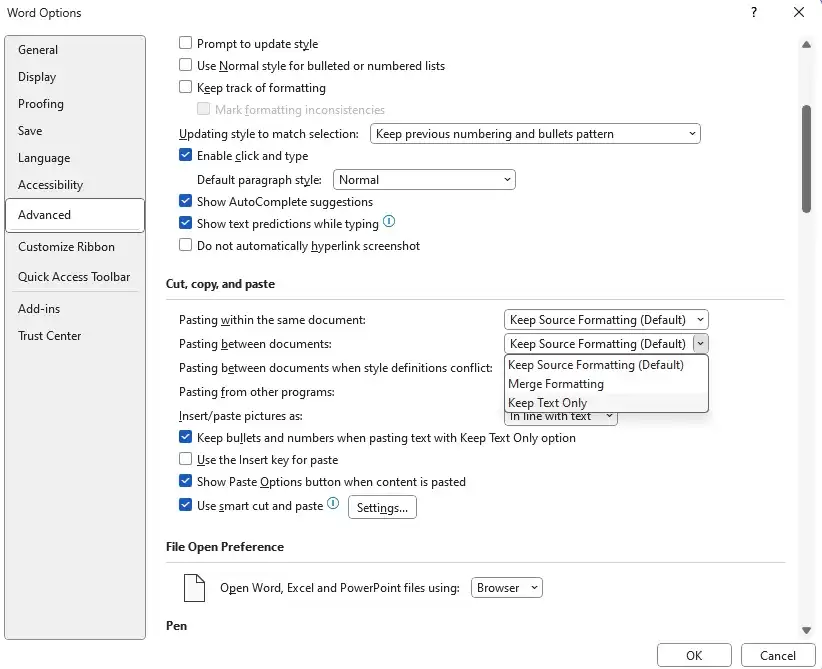
It is finally possible to modify the way Word pastes formatted text.
Word has always insisted on pasting text while retaining formatting, but an upgrade this spring offered the option to choose how you wish to do it by default. This means you can set it such that Ctrl+V only pastes text with the same formatting as the surrounding content. Merge formatting is another new option that retains the bold/italic/underline/overline and list styles while matching the target font, color, and size. This lets you copy a structured list from a Helvetica document to Aptos, Word’s standard typeface.
Word Autoformat
autoformat
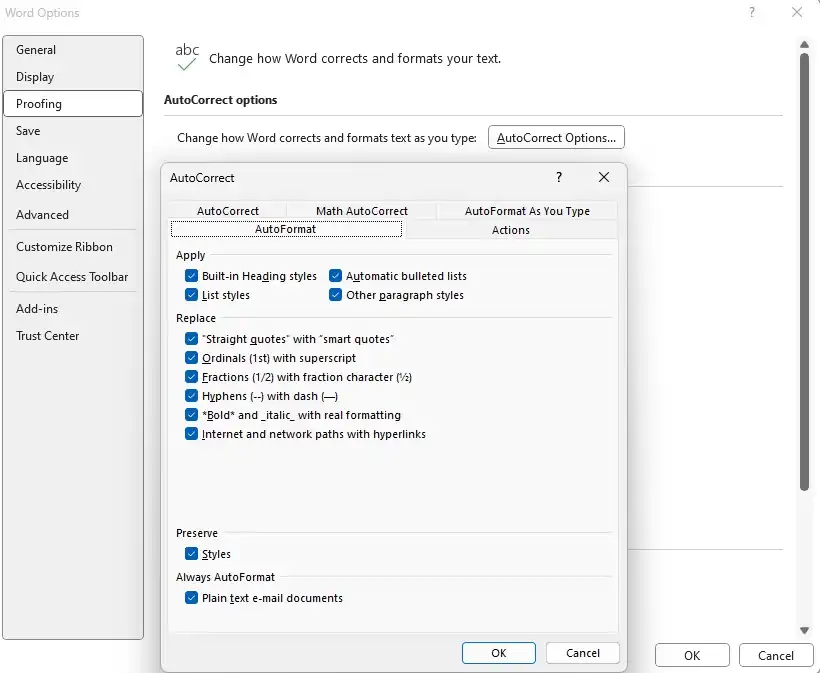
When you press return to create a new paragraph, the program will automatically modify a section that begins with a number to a numbered list. You may change this behavior in the options. Go to File > Options > Proofreading. Select the Autoformat tab from the Autocorrect settings menu. You’ll notice a lot of checkboxes for stuff you don’t want, such as automated bullet points.
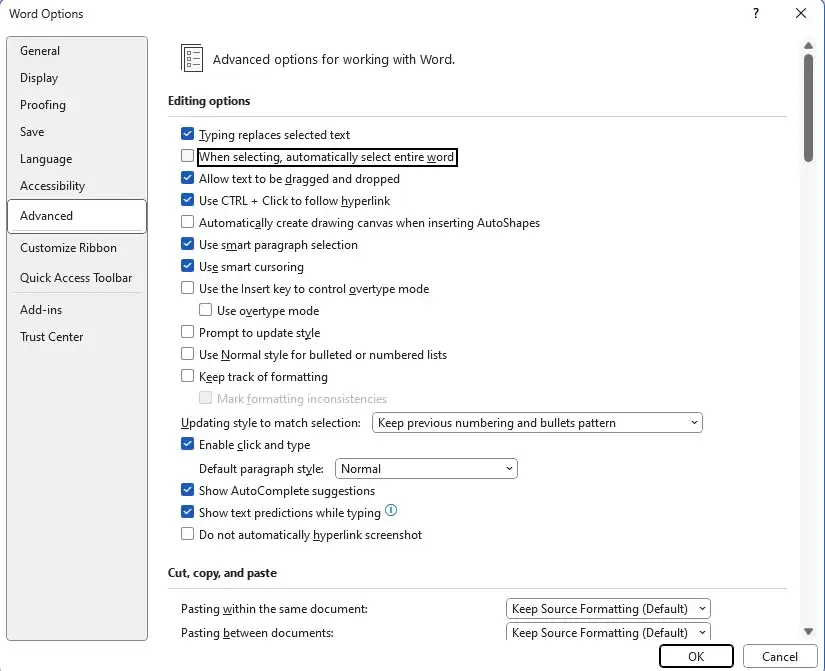
Another irritant for many is Word’s insistence on highlighting entire words. For example, suppose you want to delete a sentence from the first letter halfway through the fourth word. In that case, it may appear impossible to get the highlighting right, so pressing the backspace key once will delete only that portion because as soon as you pass a space, Word begins highlighting one word at a time rather than one character.
Word Editing Options
editing-options
This may also be easily corrected by going to File > Options > Advanced and checking the box next to When selected, automatically choose a complete word. Word will highlight precisely what you desire. Suppose you don’t want Word automatically adding a new paragraph mark when you pick an entire paragraph. In that case, you can uncheck the Customize paragraph markup option and paste the paragraph into another paragraph.
Change the default stylesheets.
Modify-styles
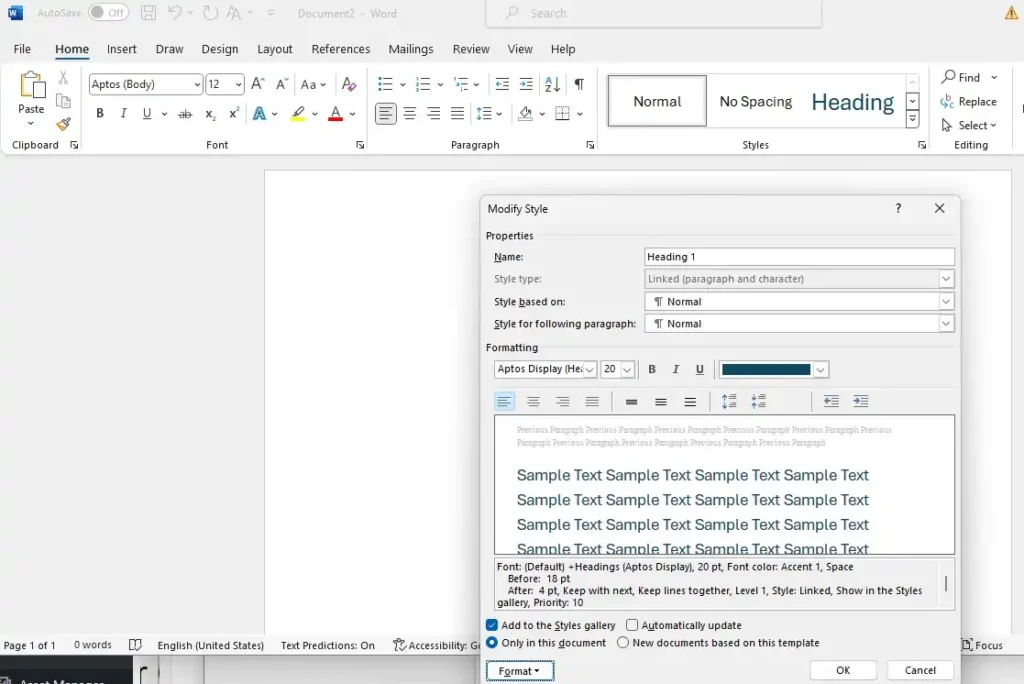
Have you ever wondered why Word comes with numerous stylesheets featuring blue text? Or how to change the default fonts in new documents? The good news is, these days, it’s surprisingly easy to customize Word to your liking.
Right-click a style, such as Heading 1, and select Modify. Make any adjustments, such as using black text or changing the typeface. When you’re satisfied, click New documents based on this template, then OK to save your modifications to the default template. If you modify the style sheet Normal, it will affect several other templates that rely on it: No spacing, subheading, quotation, strong quote, and list piece all use the same font as Normal.
Mastering the search function.
Word-find-menu
As you’re presumably aware, Word offers a search tool. You’re undoubtedly also familiar with the slightly more complex Find and Replace functionality. However, Word’s search engine is far more sophisticated, and you can look up stuff you have yet to consider.
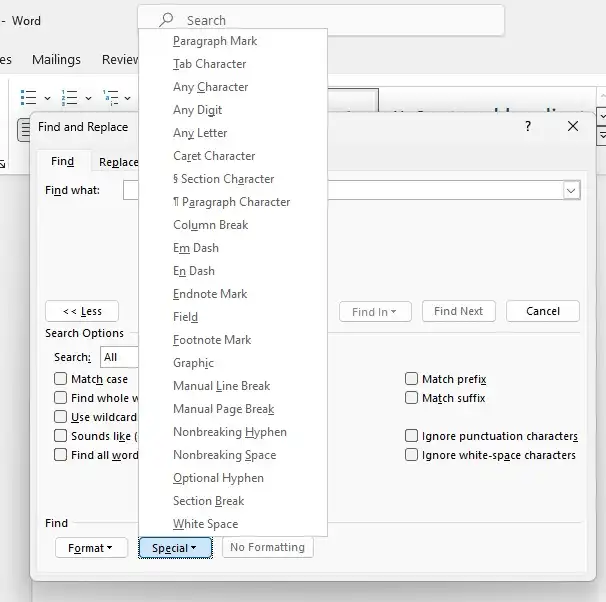
Select Find to the right of the typefaces in the Home ribbon, followed by Advanced Find. The dialog box that appears has three tabs: Replace is the standard search and replace feature, and Go to provides a shortcut to a page number or bookmark, for example. However, on the Find tab, a More button displays various search settings.
Two drop-down menus provide more search options. The Format menu allows you to search for text with a specific font or italicized font. The Special menu locates special characters like line breaks and tricky spaces.
Transcribing recorded calls.
transcribe
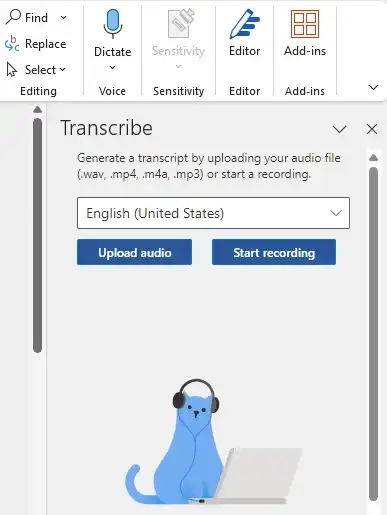
Do you have an audio recording you do not want on “paper”? Word now includes an AI-based transcription tool to make things easier. Click Dictate on the right side of the Start tab on the Ribbon and pick Transcribe; the feature will appear in the right column.
If English is not already preset, select it, and then click Upload audio to transmit a recording to the Microsoft server. The transcription may take a while; Word will notify you when it is complete. When it is, click Add to document, where you will see four options for formatting the text.
When I tested it, the results were full of errors. Therefore, it cannot be used directly in any text. However, it is compelling enough to grasp what the speakers have said based on context and can be documented clearly if necessary.
Word’s desktop version now has audio transcription capabilities. This function is still entirely free.
Share documents with others and co-edit.
Word-Share
When Google started gaining ground in Office’s market, one of the reasons was the ease with which multiple collaborators could edit a document or spreadsheet simultaneously. Recognizing the value of collaborative editing, Microsoft introduced similar tools in 2013, making teamwork and document creation more efficient.
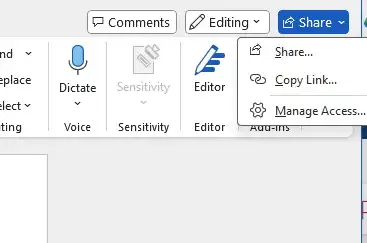
Today, inviting others to edit documents in Word, Excel, and PowerPoint is simple, and they may do so using either the desktop or web applications. To get started, make sure the document is saved to OneDrive. Then click the Share icon in the upper right corner. There are two possibilities here: invite and share with certain people or establish a link that anybody may use. The former is safer, but if you don’t know the email address the person you’re inviting uses for their Microsoft account, a link is more convenient.
If more than one user has a document open for editing, everyone can see where the others are working. This lowers the danger of editing conflicts that can occur when two individuals make changes in the same spot at the same time. If a quarrel arises, Word can assist in resolving it.
Read and repair old versions of documents.
Saving your papers on OneDrive has various advantages over keeping them locally. First, autosave is enabled, so you don’t have to sit and press Ctrl+S simultaneously. Sure, Word has a recovery option in case of a crash, but many users have horror stories of enormous documents that they forgot to save and then disappeared without a trace, never to be recovered.
Another advantage is that OneDrive stores version history, allowing you to revert to prior document versions without saving multiple versions. “Report_last_draft_final_final_final.docx” will no longer exist.
Here’s how you can find older versions:
1. Open the document from OneDrive.
2. In the Word window, click on the above file name.
3. Select Version History to see the current version and a list of previously saved versions on the right.
4. To view a prior version, click on it.
5. To restore the old version, click the Restore button in the yellow strip below the toolbar or select and copy text, which you can then paste into a new document or the latest saved version to restore only that section.
Draw
Word-draw-menu
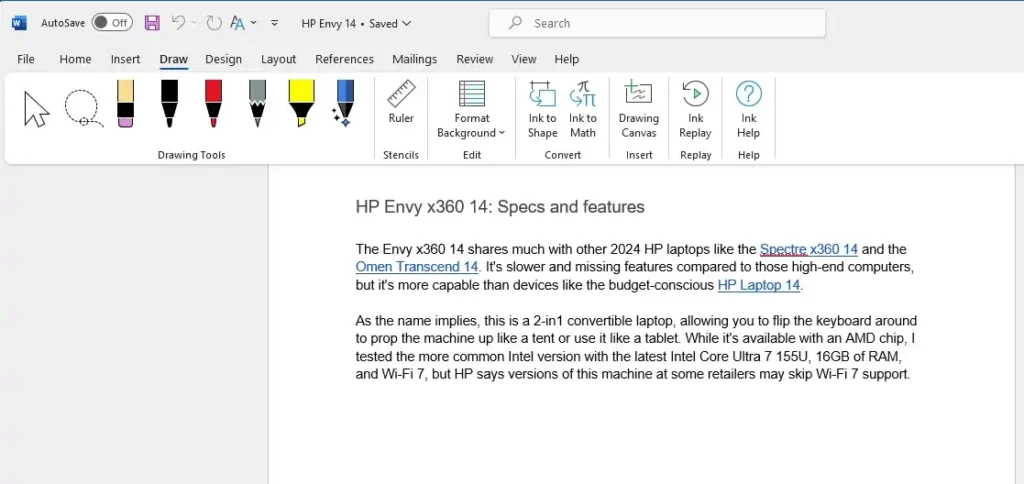
Word has always featured options for inserting images and shapes into documents, but did you know that it now includes sketching tools? Microsoft included them to make Word more accessible on PCs and tablets with touchscreens and/or pens, but they are equally compatible with a mouse or trackpad.
To view the different options, click on the Draw menu tab. On the left, there are various pens, erasers, and two types of markers. The next button is Ruler, which displays a virtual ruler over the paper, allowing you to create straight lines. To modify the ruler’s angle, hold the pointer above it and scroll the mouse scroll wheel (or drag with two fingers on the trackpad). To relocate it, click and drag.
Other capabilities could be more intriguing, except Ink to Math, which allows you to print formulas and equations with proper formatting easily.
AI writing aid with Microsoft Editor and Word Editor.
Editor-AI-Word
Microsoft Editor is a sophisticated, AI-based improvement to Word’s long-standing spell and grammar checker. It is pre-installed with Word and Outlook on Windows and Mac, but it is also available as an extension for Chromium-based browsers like Edge and Chrome.
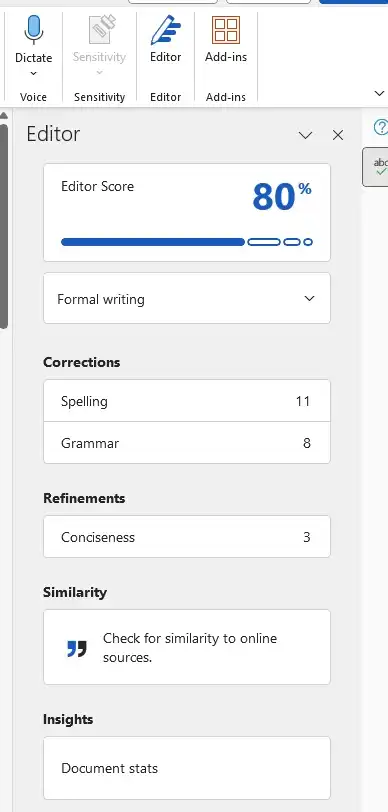
In Word, the Editor is located beneath the button on the right side of the Start tab in the Ribbon. It opens in a column to the right of the window.
A percentage rating of the document appears at the top of the Editor. The proportion increases as you solve the problems discovered by the tool. Below the judgment, there are four sections: Corrections, which displays spelling and grammar errors; Refinements, in which the program suggests changes to make the language more formal and precise; Similarity, which compares your text to online sources; and Insights, a shortcut to the old Readability Statistics feature that displays figures such as the number of sentences per paragraph and the number of words per sentence.
Click on each subcategory to view the Editor’s recommendations. As with the previous spelling feature, you can alter, ignore, or add terms to the glossary and accept or reject any proposed modifications.
Related articles from your friends at Your Career Place. Thank you for visiting Your Career Place.
Adam Grant Posits the Essential Element for Continuous Learning Boils Down to This 1 Thing. You May Not Be Fond of It
We tend to avoid being incorrect. However, it’s time to become more at ease with it.
My journey of embracing diverse perspectives might seem enigmatic. One day, I find myself leaning toward the left; the next, I’m drawn to the right. Sometimes, I watch a YouTuber who strongly opposes another YouTuber who has been a regular on my watch list for a while.
Yet, it’s all intentional.
I’ve intentionally set a personal challenge for myself: interacting with content that, in theory, contradicts my views and stances. I strive to expose myself to ideas I may disagree with and even engage with content that I find incredibly offensive or even, as bold as it sounds, foolish. This is my way of combatting echo chambers and, consequently, evolving in my way.
Renowned organizational psychologist and author Adam Grant offers poignant guidance for those dedicated to ongoing learning: Engage with individuals with opposing views. This recommendation may appear counterintuitive, discomforting, or even unattractive, but it is firmly rooted in psychological principles that uncover the constraints and predispositions in our comprehension.
The psychology behind agreement and bias
People naturally incline towards affirmation. We search for information, opinions, and environments that align with our existing beliefs, a phenomenon called confirmation bias. This bias drives us to prefer information that validates what we already know or believe while disregarding or underestimating information that challenges our perspectives. It results in an echo chamber effect where our notions are continuously reinforced, giving us a sense of certainty and correctness.
Grant’s counsel addresses the fundamental issue of cognitive blind spots. There are things we are aware we know, things we recognize we don’t know, and, significantly, things we are oblivious we don’t know. This last category poses the most significant risk for personal and intellectual development as it comprises gaps in our knowledge and understanding that we are entirely unaware of. Engaging with dissenting voices and viewpoints helps to illuminate these blind spots, unveiling areas where we may lack knowledge or are misinformed.
The Dunning-Kruger effect, a cognitive bias in which individuals with limited expertise or competence in a field overestimate their abilities, further clouds our comprehension. When unaware of our limitations, we become overly confident in our views. Engaging with dissenters can function as a reality check, spotlighting our shortcomings and encouraging us to learn and progress.
Cognitive dissonance, the mental discomfort encountered when holding conflicting beliefs, is crucial to our intellectual growth. When confronted with disagreement, we are compelled to address this discomfort, prompting us to reject the contradictory information or reconsider and potentially revise our beliefs. Though this process may be uncomfortable, it is imperative for intellectual growth and the enhancement of our understanding.
The advantages of embracing dissent
Engaging with divergent viewpoints is not just about expanding our knowledge; it’s about fostering intellectual humility. This involves acknowledging that our knowledge and understanding have inherent limitations and that others may possess valuable insights we lack. Intellectual humility nurtures a growth-oriented mindset, prompting us to view challenges and opposition as chances for learning rather than threats to our self-esteem.
Many individuals shy away from disagreement out of fear of conflict. Nonetheless, constructive conflict can result in increased understanding and innovation when approached with an open mind and a willingness to learn. Engaging respectfully and thoughtfully with opposing opinions can solidify connections and construct bridges, cultivating a culture of learning and cooperation.
To actualize Grant’s guidance, actively seek out diverse perspectives. Engage in groups or forums where your beliefs are challenged. Engage in debates and conversations with an open mind. Practice active listening, aiming to comprehend the underlying rationales behind differing viewpoints rather than merely waiting for your opportunity to dispute them.
Adam Grant’s advice may be unsettling, yet it serves as a potent driver for lifelong learning. Communicating with those with contrasting views confronts our biases, unveils our blind spots, and nurtures intellectual humility. This process broadens our comprehension and equips us to navigate an increasingly intricate and diverse world. Embrace the discomfort of disagreement—the gateway to continual growth and learning.
Related articles from your friends at Your Career Place. Thank you for visiting Your Career Place. We look forward to assisting with your career goals.